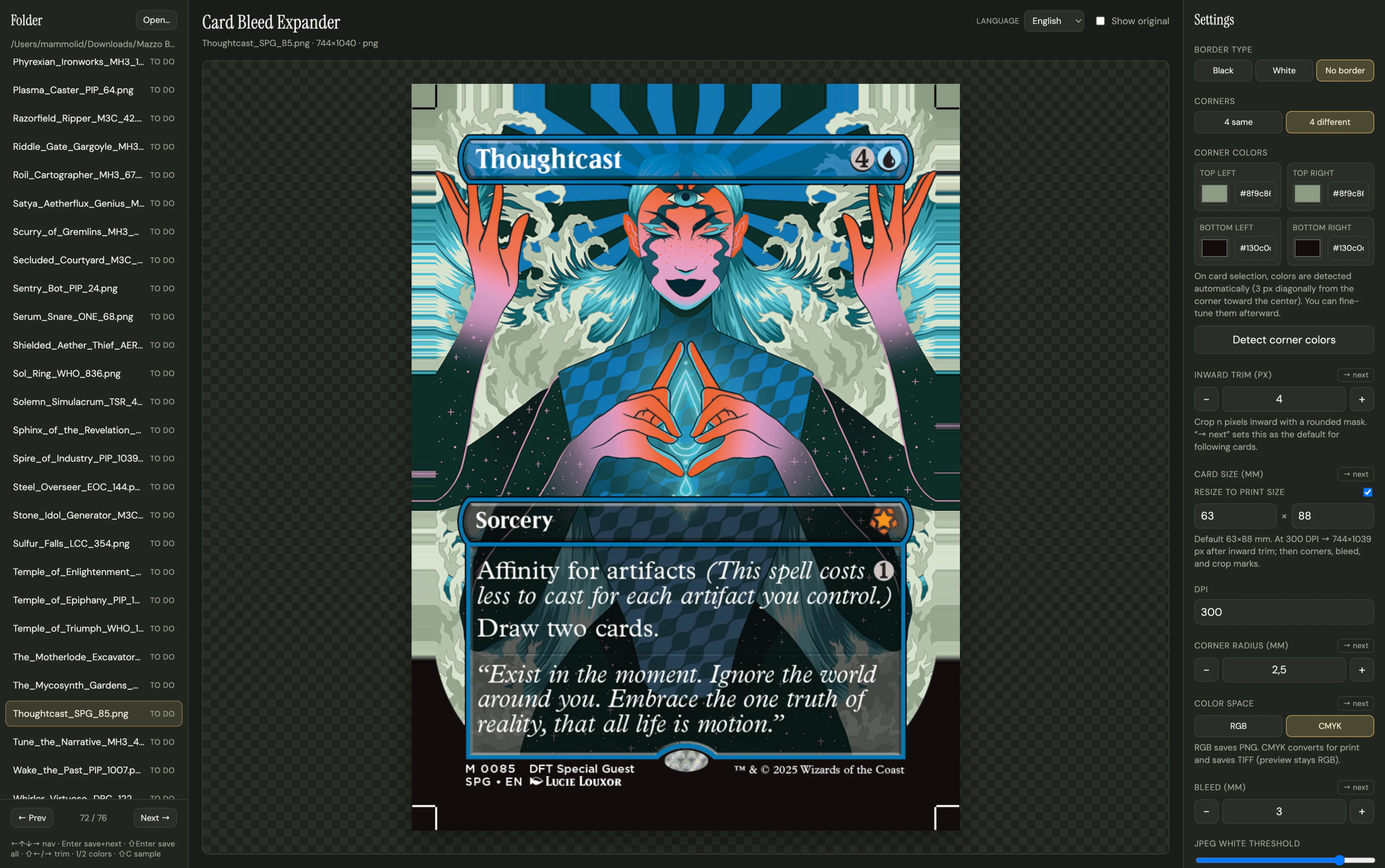
I built a browser tool that takes the card image and extends its edges automatically. Edges are extended by repeating the outermost row of pixels; for the corners, the tool samples colour along the diagonal towards the centre, so the rounded corners of a card scan fill cleanly instead of leaving white gaps.
Around that core: crop marks, trim and border controls, the standard 63 × 88 mm size, RGB or CMYK output, and batch processing of a whole folder with Save, Save & next or Save all. Everything runs client-side on an HTML Canvas, so card images are never uploaded; the only server code is a small Vercel function for a private feedback form.
A second feature removes the step before that: paste a deck list and the tool downloads the card images directly, for Magic: The Gathering, Pokémon and Yu-Gi-Oh!, ready to be processed and printed. Images come from public card databases: Scryfall for Magic, the Pokémon TCG API and YGOPRODeck.
The first version was a desktop app (.exe / .dmg). When friends with the same problem wanted it, I realised that asking people to install an unknown executable is a real barrier, so I rebuilt it as a web app: nothing to install, and the source is open for anyone to check. I then shared it for free in Reddit communities for home printing.